

Description
Download You Don't Need a CRM – Sales Pipeline & Lead Tracking
Overview
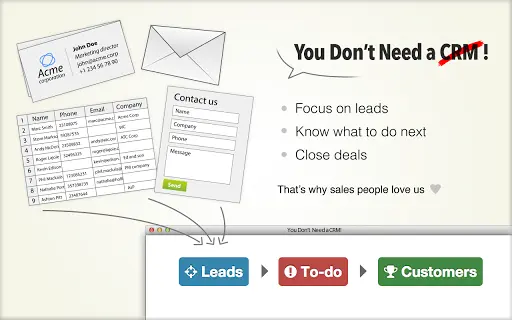
The software, titled You Don't Need a CRM, is designed as a streamlined alternative to traditional customer relationship management (CRM) systems. It targets sales professionals and small business owners who seek efficiency in converting prospects into customers without the complexity of conventional CRMs. The core purpose is to simplify lead tracking and deal management by eliminating unnecessary form filling and data entry. Instead of overwhelming users with features, the software focuses on essential sales activities such as lead creation, task management, and pipeline visualization.
It addresses common pain points associated with existing CRM platforms—such as time-consuming data entry, cluttered interfaces, and steep learning curves—by offering a minimalist, task-driven approach. Ideal for independent salespeople, small sales teams, and entrepreneurs, it supports real-world workflows like tracking inbound leads from websites, scanning business cards, and managing follow-ups in a single interface. The software enables users to maintain focus on closing deals rather than managing administrative tasks.
Although the developer's background is not detailed in the provided information, the product’s design philosophy suggests a strong emphasis on usability and productivity. The solution is positioned as a lightweight, intuitive tool that helps users prioritize actions over data collection. By centralizing tasks and automating follow-ups, it aims to enhance sales efficiency and team collaboration, particularly for organizations seeking a no-frills approach to sales pipeline management.
Key Features & Capabilities
- Minimalist Lead Creation – Users can create leads in seconds without filling out lengthy forms, reducing friction in capturing new prospects.
- Unified Task Dashboard – All tasks are displayed on a single page with automatic follow-up reminders, enabling users to stay on top of their sales pipeline.
- Spreadsheet Integration – Import and export data from spreadsheets, allowing seamless data transfer from existing sources like Excel or Google Sheets.
- Business Card Scanning – Automatically extract contact details from business cards, speeding up lead onboarding.
- Customizable Sales Pipeline – Define and adjust pipeline stages to match specific sales processes or workflows.
- Website-Based Lead Capture – Create leads directly from a website, ideal for inbound marketing and lead generation campaigns.
- Team Collaboration Tools – Emphasizes teamwork through shared access and coordinated actions across team members.
- Multi-Language Support – Available in English, French, Spanish, Portuguese, and Russian, supporting international users.
These features are designed to support practical sales workflows, such as capturing leads during networking events, managing follow-ups after webinars, or synchronizing data from marketing tools. The automation of reminders and the centralized interface help users maintain momentum in their sales cycles. By focusing on action-oriented functionality rather than data-heavy reporting, the software streamlines the path from lead to closed deal.
User Interface, Workflow & Performance
The user interface is structured around simplicity and efficiency, prioritizing direct access to key actions. Navigation is streamlined, with a single-page dashboard that consolidates all tasks and pipeline stages. This layout reduces cognitive load and allows users to focus on immediate next steps without navigating through multiple menus or tabs.
Workflow efficiency is enhanced by the software’s automation features, such as automatic follow-up triggers and one-click lead creation. The interface supports intuitive interactions, such as drag-and-drop pipeline management and instant form submission. While specific performance metrics like CPU or RAM usage are not provided, the software’s lightweight design—25.8 MB in size—suggests low resource consumption, which is beneficial for users on older or less powerful systems.
The developer did not specify resource usage details, but the minimalistic design implies optimized performance. Stability is expected to be consistent, especially given the software’s focused feature set. General software behavior patterns suggest reliable operation during regular use, though real-world performance may vary based on system configuration and data volume.
Compatibility & System Requirements
You Don't Need a CRM is compatible with both Windows and Mac operating systems, making it accessible to a broad range of users across different platforms. The software version is 1.0, with an installation size of 25.8 MB, indicating a compact footprint suitable for quick deployment.
Exact system requirements were not listed, so users should refer to the official documentation or installer for details on minimum hardware specifications. The developer did not provide additional system requirements, and compatibility information is limited to the supported platforms. Users are advised to ensure their systems meet standard desktop application requirements for smooth operation.
Pros and Cons
Pros
- Simple, intuitive interface designed for quick adoption
- Eliminates time-consuming form filling and data entry
- Single-page dashboard for efficient task management
- Automatic follow-up reminders improve workflow consistency
- Supports team collaboration with shared access
- Multi-language availability increases global accessibility
- Lightweight installation (25.8 MB) for fast setup
- Website lead capture enables seamless inbound sales integration
Cons
- Exact system requirements not specified
- Advanced reporting features not mentioned
- Cloud-based functionality details not provided
- Offline mode capabilities not confirmed
- Limited information on backup and data security practices
FAQ Section
Is You Don't Need a CRM available for Windows and Mac?
Yes, the software is compatible with both Windows and Mac operating systems.
Can I use this software without an internet connection?
The developer did not specify whether offline functionality is supported. Users should check the official documentation for details on connectivity requirements.
Is there a free version available?
Yes, a 15-day free trial is available with no credit card required. After the trial, pricing starts at $19 per month for the first user, with additional users at $7 per month.
How often are updates released?
Information about update frequency was not provided. Users should refer to the official website for release schedules and version history.
What kind of license does the software use?
The licensing model is subscription-based with no long-term contracts. The exact license type is not specified in the provided information.
Final Thoughts + CTA
You Don't Need a CRM stands out as a refreshingly focused tool for sales professionals tired of bloated CRM systems. By removing unnecessary complexity and prioritizing actionable tasks, it delivers a lean, effective solution for managing leads and closing deals. Its clean interface, automation features, and team collaboration tools make it ideal for small teams and solo entrepreneurs who value speed and simplicity.
While some advanced features like detailed reporting and offline access are not confirmed, the software’s core strengths lie in its ability to streamline the sales process without sacrificing usability. For users seeking a lightweight alternative to traditional CRMs, this tool offers a compelling blend of functionality and ease of use.
Download You Don't Need a CRM now and experience a smarter way to manage your sales pipeline and convert leads into customers.
Guides & Tutorials for You Don't Need a CRM! App for Chrome
How to install You Don't Need a CRM! App for Chrome
- Click the Preview / Download button above.
- Once redirected, accept the terms and click Install.
- Wait for the You Don't Need a CRM! App for Chrome download to finish on your device.
How to use You Don't Need a CRM! App for Chrome
This software is primarily used for its core features described above. Open the app after installation to explore its capabilities.
User Reviews for You Don't Need a CRM! App for Chrome 0
No reviews found





